
Every drawing in Procreate is secretly the first frame of a movie. The app keeps a tiny animation studio in the back room — Animation Assist — and once you switch it on, a still picture learns to walk, blink, and bounce.
Procreate 裡的每一幅畫,偷偷都是一部電影的第一格。這個 app 在後台藏了一座小動畫片廠——動畫助手——一打開,靜止的圖就學會走路、眨眼和彈跳。
The Hidden Studio
藏起來的小片廠
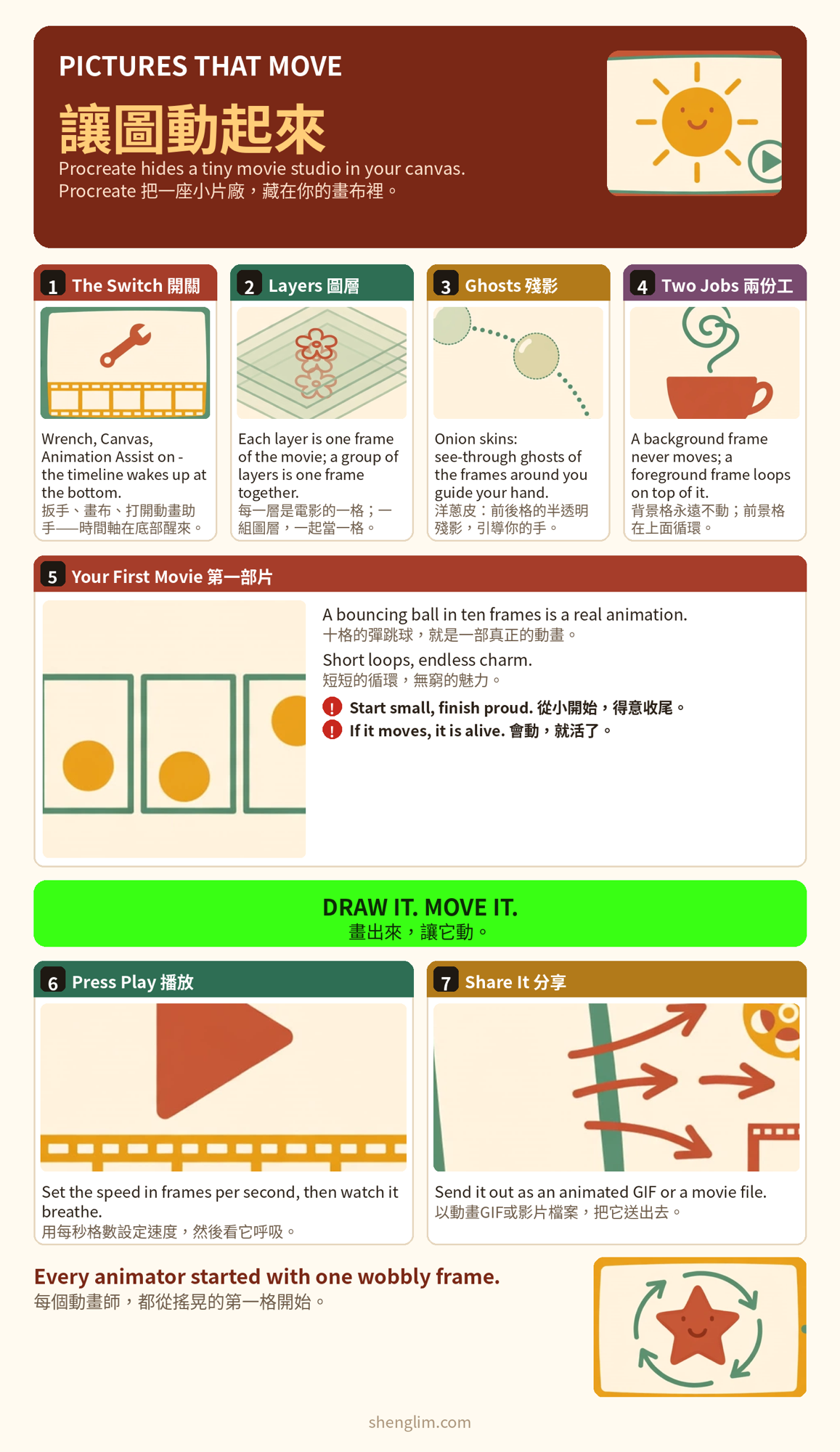
Tap the wrench, open Canvas, and turn on Animation Assist. A timeline appears at the bottom of the screen — that strip is your movie, frame by frame.
點扳手,打開「畫布」,開啟「動畫助手」。螢幕底部會出現一條時間軸——那條帶子就是你的電影,一格一格的。
There is nothing new to buy and nothing to install. The studio was inside your sketchbook the whole time, waiting for somebody to knock.
不用買新的東西,也不用裝任何東西。片廠一直都在你的素描本裡,只等有人敲門。
One Layer, One Frame
一層一格
The rule is beautifully simple: each layer is one frame. Draw the ball at the top of its bounce, add a layer, draw it a little lower, add another — the timeline fills up like a flip-book.
規則美得簡單:每一層是一格。把球畫在彈跳的最高點,加一層,畫低一點,再加一層——時間軸就像活頁本一樣填滿。
Onion skins are your guide: the frames before and after show through as pale ghosts, so you can see exactly how far the ball should fall before the next drawing.
洋蔥皮是你的嚮導:前後格會像淡淡的影子透出來,讓你看清球在下一張圖之前,應該掉多遠。
Layers that belong together can live in a group, and the group counts as one frame — one character, one drawing at a time.
屬於一起的圖層可以住在一個群組裡,群組算一格——一個角色,一次一張圖。
Still World, Moving Star
世界靜止,主角在動
Not everything should move. Tap a frame and mark it Background, and it stays frozen under the whole movie — the room, the table, the sky.
不是每樣東西都要動。點一格,標成「背景」,它就凍結在整部電影底下——房間、桌子、天空。
Mark another frame Foreground and it loops above everything else: steam that rises from the cup forever, in a kitchen that never changes.
再把一格標成「前景」,它就在所有東西上面循環:蒸汽永遠從杯子升起,在一間永不改變的廚房裡。
Press Play
按下播放
Press Play and watch your drawing breathe. The speed is yours to set — frames per second: slow for a sleepy blink, quick for a happy bounce.
按下播放,看你的畫呼吸。速度由你決定——每秒幾格:慢,是睡眼惺忪的眨眼;快,是開心的彈跳。
When it makes you smile, share it: an animated GIF for messages, an MP4 for video. Ten honest frames are a finished movie.
當它讓你微笑,就分享出去:傳訊息用動畫 GIF,影片用 MP4。十格誠實的畫,就是一部完成的電影。
Good to Know
須知
Start with the classics: a bouncing ball, a blinking face, steam over tea. Every animator in history started with something small that moved.
從經典開始:彈跳的球、眨眼的臉、茶上的蒸汽。歷史上每個動畫師,都是從會動的小東西開始的。
Duplicate your artwork before you animate it — keep the still version safe, and let the copy do the dancing.
動畫之前,先複製一份你的畫——靜止的版本好好收著,讓複本去跳舞。
A short loop beats a long plan. Eight to twelve frames that circle back to the start will charm people more than a minute you never finish.
短循環勝過長計畫。八到十二格、能繞回開頭的畫,比一分鐘永遠做不完的作品,更能打動人。
Let’s Talk About It
來聊一聊
Mia shows Tom her iPad over coffee.
Mia 在喝咖啡時,把 iPad 秀給 Tom 看。
Mia: Look — my coffee cup is alive. The steam actually moves!
米亞:你看——我的咖啡杯活過來了。蒸汽真的在動!
Tom: Wait, you animated that? In Procreate?
湯姆:等一下,那是你做的動畫?在 Procreate 裡?
Mia: Yep. Animation Assist. Each layer is one frame — it’s basically a flip-book.
米亞:對。動畫助手。每一層是一格——基本上就是一本活頁動畫書。
Tom: How long did that take you?
湯姆:你花了多久?
Mia: Ten frames, twenty minutes, tops. The onion skin shows the last drawing, so you just nudge it a little.
米亞:十格,最多二十分鐘。洋蔥皮會秀出上一張圖,你只要輕輕推一點就好。
Tom: I can barely draw a straight line.
湯姆:我連直線都畫不好。
Mia: Start with a bouncing ball. Everyone’s first animation is a bouncing ball. It’s the law.
米亞:從彈跳球開始。每個人的第一部動畫都是彈跳球。這是法律。
Tom: Ha! Okay — teach me this weekend?
湯姆:哈!好——這週末教我?
Mia: Deal. Bring snacks. Animators run on snacks.
米亞:成交。帶點心來。動畫師是靠點心運轉的。